How to build an AI research workforce
How I set up AI agents to collect real, traceable data for real papers.
When research means heavy data lifting, searching the web or pulling records from databases, a modern AI agent setup might take over. Here is how I set one up so that it produces real, traceable data for real papers. I have been automating data collection for years, and the latest tools have changed what a single researcher can do alone.
AI screen agents
Today’s agents do more than generate text and video. They come with reusable “skills” and can automate real work, as you see in tools like Claude Cowork, Hermes, or OpenClaw. Two years ago, to make my computer surf and collect data on its own, I had to write Python and use a browser automation or scraping tool like Playwright or Beautiful Soup. Worth mentioning: research labs without that technical skill used student support or even low-cost outsourcing platforms like Mechanical Turk. A good reason why an AI agent setup is worth considering!
First, I played around with AI browsers like Atlas and the Perplexity browser. I hoped I could use them for automated collection. But large, traceable, reliable runs were not possible: rate limits, capacity limits, or simply outside what the product was built for.
The newest tools are different. They use a computer the way a person does (AI providers call it computer use). They open apps, browse the web, and actually read the rendered page, not just the underlying HTML. After many rounds of trial and error, here is a setup that works, is reasonably safe, and has already produced data that did not exist before and would have cost me weeks by hand.
Setup for researchers
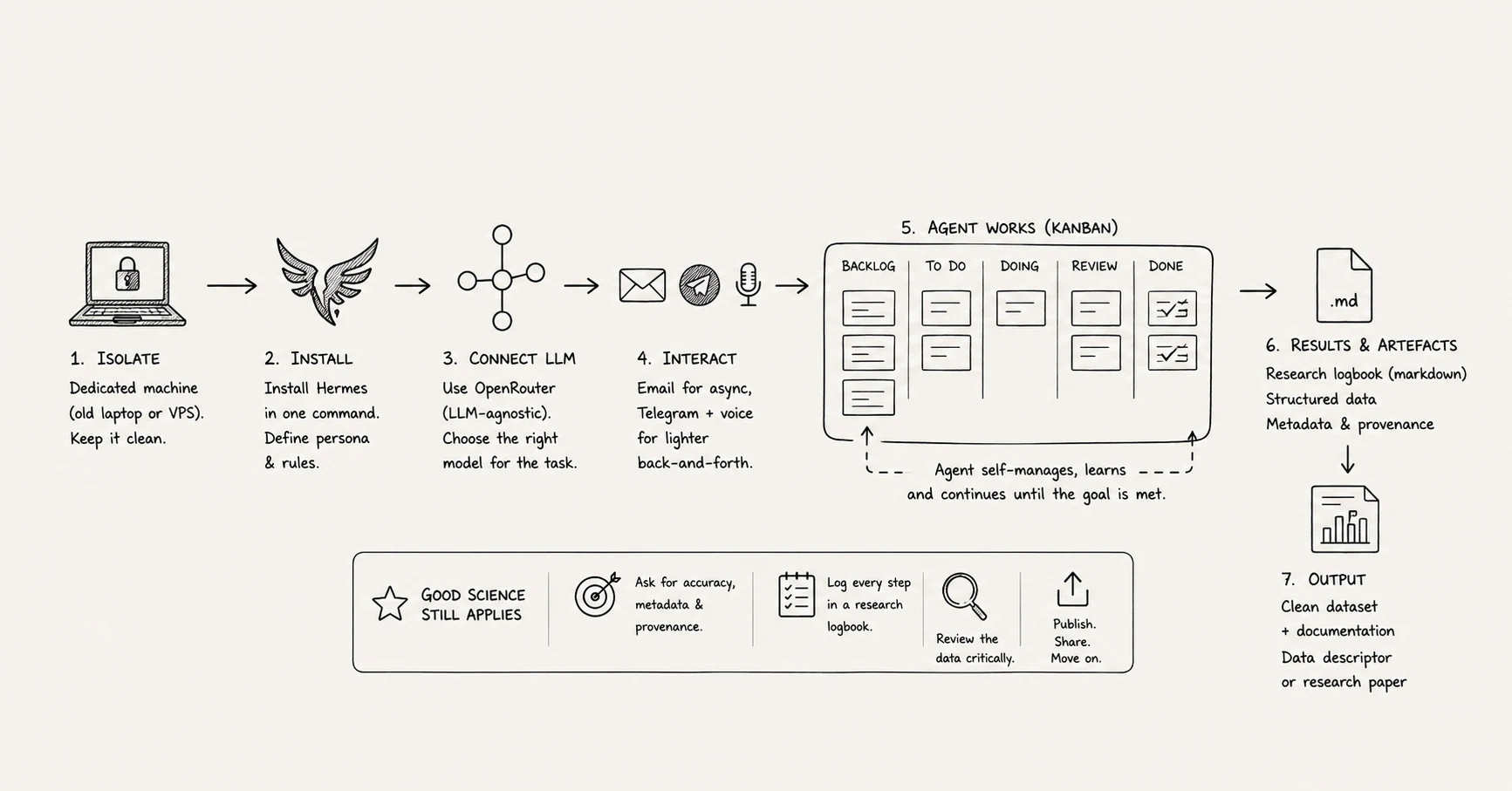
The single most important rule is isolation. Use a dedicated machine, an old laptop you no longer need, or rent a virtual private server (VPS).
In my case, an agent called Hermes sits on an old, completely empty Linux laptop next to me. I keep it running and stop worrying about it. I also use Claude Cowork, which works well, but for large collection jobs you hit token costs and the machine has to stay on. A dedicated box avoids both.
Hermes installs from a single command, and the docs walk you through it. It ships with a “soul,” which becomes your research assistant: I told mine to behave like a diligent, accurate PhD student who checks facts, prefers high-quality publications, and knows its research field very well.
You will need an API key to connect it to a large language model and if you want to be independent from single providers, OpenRouter is a clever, LLM-agnostic choice, which means you fill up your OpenRouter account (and therefore your agent) with some budget and you will be able to use all the different LLM-models out there, which enables you to select simple (= cheap and fast) models for simple / triage tasks and complex deep-reasoning models for sophisticated problems.
Next, you will need a channel to interact with your agent. What is different in our scenario as researchers compared to any consumer (Chat-)GPT use: You might want to work slowly (Kahneman), which means your input prompt can be a little project on its own and you don't expect a quick or chatty answer. For this, I set up a dedicated email account so I can delegate a task and get a reply later, instead of chatting in real time. When a call for papers arrives, for example, I forward it and ask the agent to check it against my database of research ideas. For lighter back-and-forth I added Telegram, with voice, so I can simply talk to my AI agent.
Once it is installed, fire off a first task in your field to test the browsing skill. A good starter is to have the agent learn your own research profile, read your publications, and watch for new citations. You will quickly notice that it learns from each prompt and quietly builds new skills as it goes in the background.
Checking the outcome, and making research artefacts
The old problem was that agents started well, then quit after a handful of cases because of a built-in limit. With Hermes I can mark something as a background task with a goal, a measurable target, and let it run, checking itself until the goal is met (Claude Code extra: can be programmed in the same way by putting /goal before a prompt).
Persistence matters just as much. Tell the agent, in the prompt, to write results to disk as it goes, so that if it loses the connection or runs out of tokens it can pick up where it stopped. Hermes also gives each job a Kanban board: it splits a large task into single to-do items and moves them from left to right as it works. It structures its own work the way I used to teach PhD students to.
A concrete example, running as I write this: I want a list of every European municipality, with its website URL, whether a service portal exists plus its URL, and curated data about the city itself. No such database exists, least of all for Germany. It is too boring and too long to ask a junior researcher to do, but the agent simply drills through it, and may well be finished before this piece is published.
Limitations
These tools cut both ways. If you are not sure what you are doing technically, be careful, and keep it off your work machine. An agent can execute any code, which could mean a wiped drive. Scope the project tightly: pick a data-gathering task clear enough to hand over completely, no more and no less. When it is done, I publish a data descriptor or deposit the set on a research data platform, then move on to the next job with whatever tool is best by then.
From here, I leave you and your agent to it. The rules of good science still apply, so write them into the prompt: ask for accuracy, proper metadata, and data in the form your field expects. For this, I always ask my research agent to create a research logbook markdown file with all steps. Then look at the data, review it, and get it published.
The author acknowledges using Claude Opus 4.8 to assist with editing and refining this manuscript before submission, and Willow for macOS for AI transcription of oral dictation. Image creation with OpenAI Image2.

Nicolai Krüger is a professor for GovTech and applied AI. In 2025 and 2026 he was appointed as an expert to the EU AI Office, and he leads the DEAR-GOV research project. He works on applied AI in companies and public administration, from vibe coding in developer teams to AI for a capable, democratic state. More about Nicolai →